WhatsApp Business API: The worldwide pricing model (2026/2027)


TL; DR: Quick Summary
- From 1 October 2026, Meta will charge per business message, including service replies and utility messages sent within the 24-hour window.
- Your WhatsApp API messaging cost depends on message category, recipient country, and how many messages each conversation requires.
- Businesses should consolidate fragmented replies into one clear message or use WhatsApp Flows to capture multiple customer details at once, helping keep billable message volume down.
- WhatsApp Coexistence lets teams continue handling free one-to-one chats in the WhatsApp Business App while using the API for automation and campaigns.
- With SleekFlow, AI agents can respond, qualify leads, and automate follow-ups within the free entry-point window, which may remain open for up to 7 days.
- SleekFlow helps businesses control costs while replying faster, handling more conversations, and turning WhatsApp into a channel that drives revenue.
For a lot of businesses, WhatsApp is no longer just a chat app. It is the support desk, the inquiry line, the complaints channel, and increasingly the virtual storefront.
That is why WhatsApp Business API pricing matters. More than 175 million messages are sent to WhatsApp business accounts every day. At that scale, a small pricing change can become a real cost shift for teams handling sales, support, and automation on WhatsApp.
To manage this massive volume sustainably, keeping a close eye on Meta’s underlying infrastructure costs is essential.
This guide breaks down how WhatsApp Business API pricing works in 2027, what changes on 1 October 2026, how to estimate your new cost exposure, and how to keep WhatsApp useful without letting message volume become a bad cost.
How does Meta charge for the WhatsApp Business API?
Currently, businesses are charged when sending pre-approved template messages through the WhatsApp Business Platform, such as marketing promotions, utility updates, and authentication codes. Template messages are essential for businesses to reach out first when there's no active 24h window.
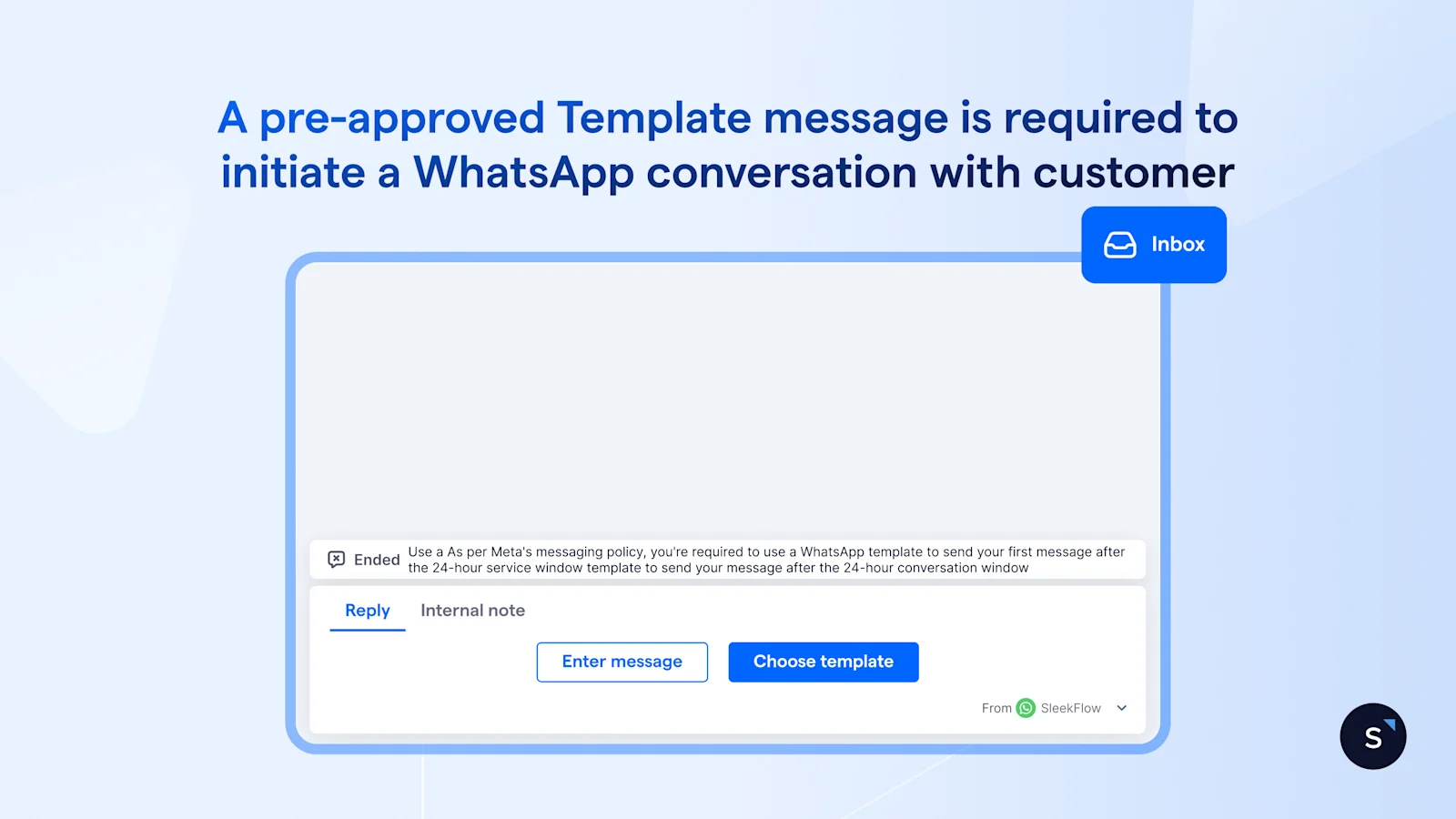
When a customer messages your business first, it opens a 24-hour window, during which you can send any free-form message for free.
What changes on 1 October 2026?
From 1 Oct 2026 onwards, Meta charges per-business message sent based on the message category and the recipient's country.
Service messages (a.k.a the free-form/non-template messages) become chargeable, billed at the same rate Meta already charges for utility and authentication templates in that market.
Meta will introduce a free monthly tier of service messages. Each month, every phone number will receive 1,000 free service messages; Meta will only charge as of the 1,001st. These free service messages do not roll over if not used in a specific month and reset monthly, for each business phone number.
Utility messages sent within the 24-hour conversation window become chargeable.
The 24-hour window itself doesn't change: template messages are still required if businesses want to initiate a conversation, and it still opens when a customer messages you and resets with each new message from them.
This is the important shift. The cost impact will not only come from campaigns anymore. It will come from everyday conversations, too.
What are the WhatsApp Business message categories?
WhatsApp sorts every business message into categories, each with its own rate. The category affects what Meta charges and how you should design the customer journey.
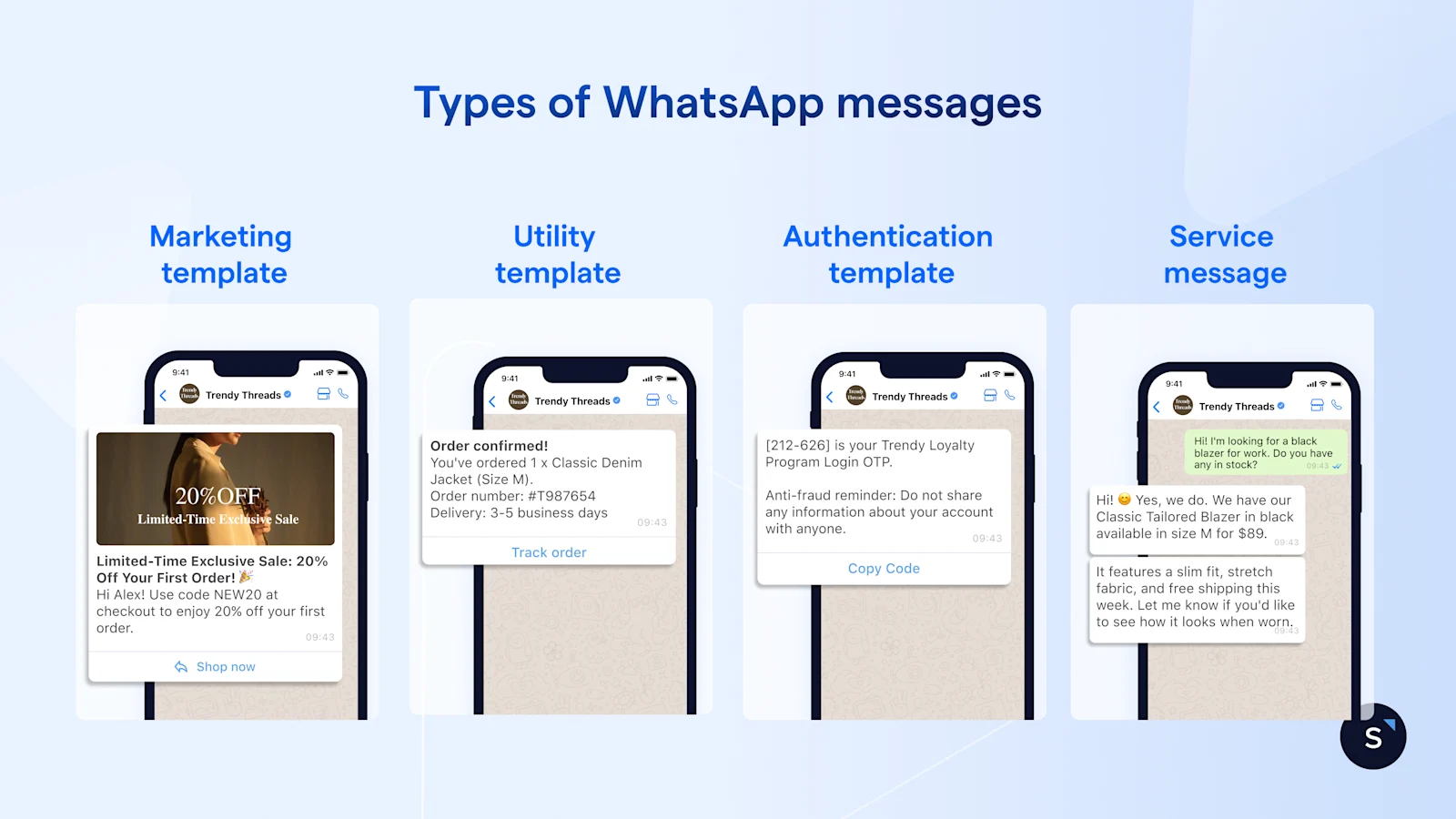
The factors of the WhatsApp API cost
Your bill comes down to two factors: the rate on each message, set by the recipient country and message category, and the number of messages you send.
1. Recipient's country/region and message category
Meta's rates vary widely by the recipient's country code and by category, so the same reply can cost several times more in one market than another. This matters most for businesses with an international customer base.
Some countries also carry a special international authentication rate. If you send an authentication template to a user in one of those markets, the message bills at that specific rate.
A detailed breakdown of Meta's per-template message charges is provided in the table below.
WhatsApp Business API pricing is determined by Meta and is subject to change. For the latest rate card, please refer to Meta’s website.
2. Number of messages sent
Rates only tell half the story; the other half is how many billable messages a conversation takes, which comes down to its length and complexity.
A quick stock check might be one message;
A return that needs an ID check, an order lookup, and a resolution can run a dozen.
Long, complex conversations, chatty multi-turn chatbot replies, and agents who reply in a burst of short bubbles all push the count up, and conversation length is the factor you control most.
3. Volume of template messages
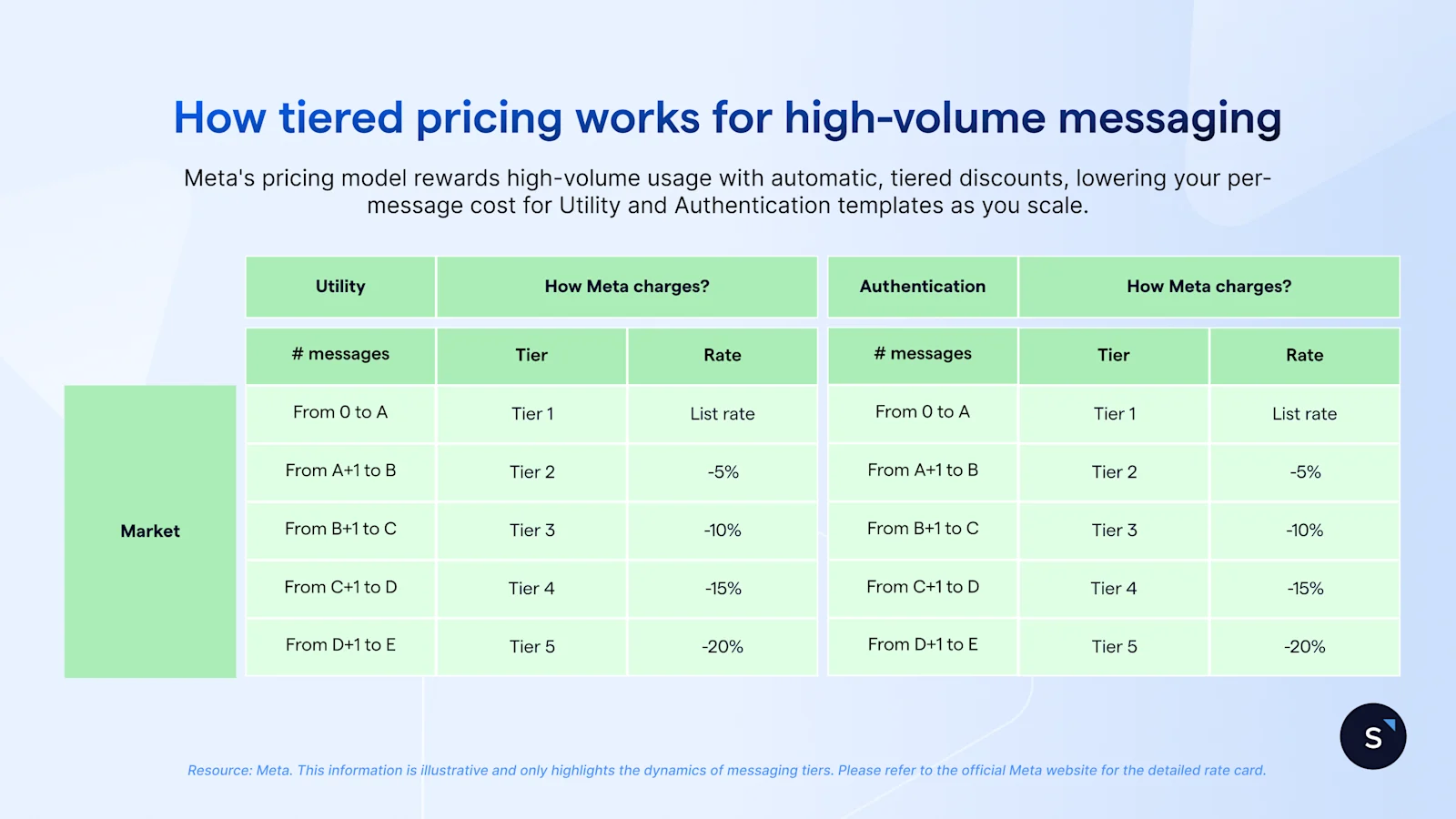
Meta's per-message rates aren't flat. WhatsApp offers volume-based discounts for businesses that send a high volume of utility or authentication messages. As you send more messages, you unlock progressively lower rates through a tiered system.
This per-message price automatically decreases as you move into higher tiers within a calendar month, specifically for chargeable templates sent to a particular country. Upon reaching the next tier for a given market-category pair, your business unlocks the corresponding lower rate for messages sent within that new tier.
It's important to note that the lower rate only applies to messages sent within that specific tier. For example:
If Tier 1 (0-1,000 messages) costs $0.05 per message and Tier 2 (1,001-10,000) costs $0.03, you will pay $0.05 for each of your first 1,000 messages.
Beginning with your 1,001st message, the rate drops to $0.03 for all subsequent messages up to 10,000.
These tiers are calculated independently for each country and message category, and the count resets at the beginning of each calendar month.
Service messages don't qualify for these discounts, and neither do marketing templates. Since every service reply bills at the standard rate, however much you send, from 1 October 2026, it's both newly billable and the category that never gets cheaper at scale. The way to control it, then, is to send fewer of them, not more.
For more details, check out the official volume tiers pricing here.
What is the impact of the October 2026 pricing change?
The impact splits sharply by how you use WhatsApp.
Teams that run mostly broadcast campaigns with little back-and-forth with their contacts will see a small increase.
Teams that lean on WhatsApp for support and sales conversations will see a more noticeable rise in costs.
How to estimate your WhatsApp cost
If you're weighing the WhatsApp Business API for the first time, size the full cost. Total monthly cost is the number of messages you expect to send in each category, multiplied by that category's rate for the recipient's country, and summed across all markets you'll message.
For your exact figure, run your own volumes through SleekFlow's WhatsApp pricing calculator.
How do I know how many service and utility messages I'm sending?
If you already run the WhatsApp Business API, the faster path is to price the increase, not the whole bill. Only the newly billable traffic changes your cost: service messages and in-window utility replies that are free today.
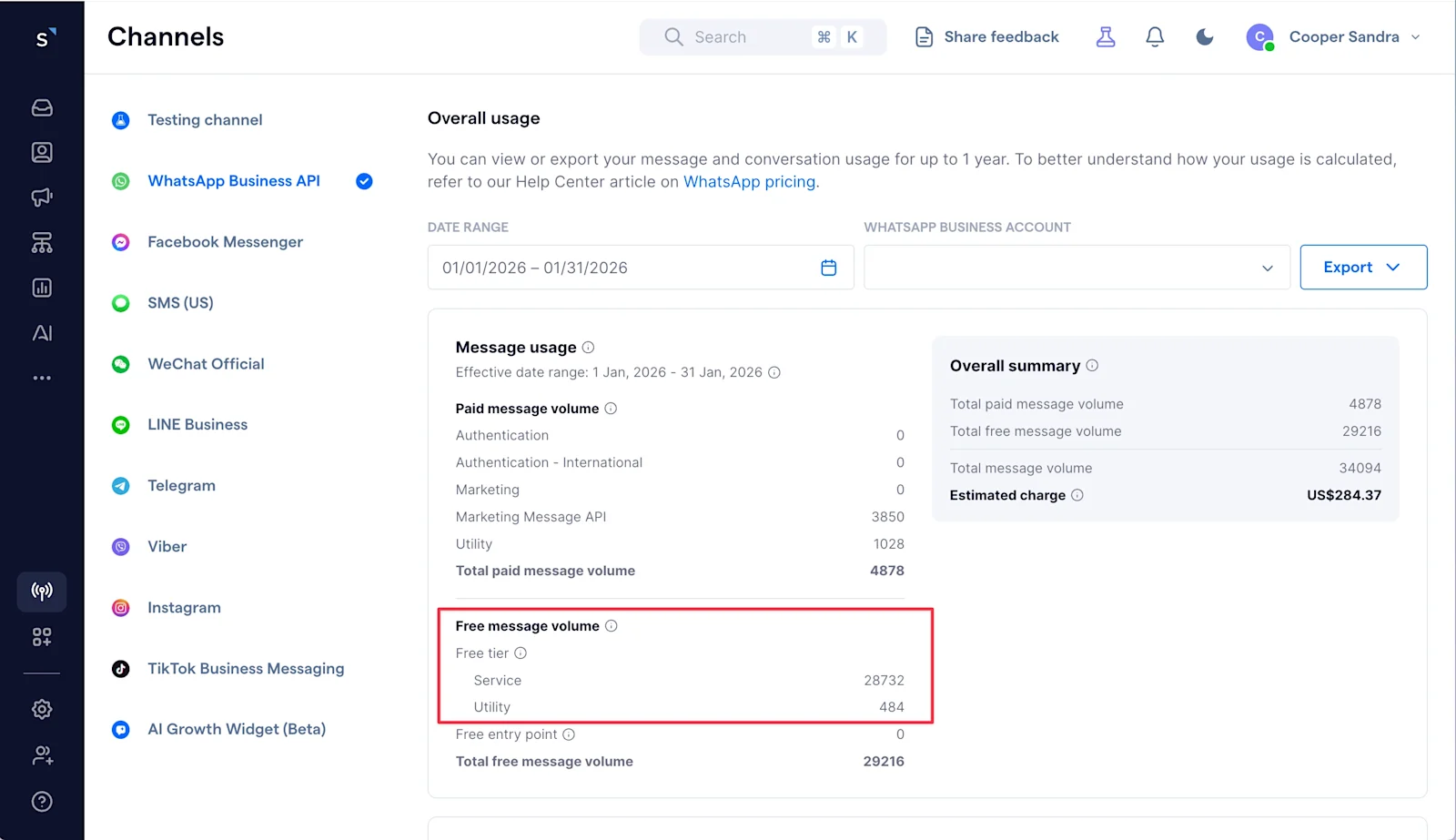
Your free-tier message count is the number that starts billing. In SleekFlow, pull it in a few clicks:
Go to Channels → WhatsApp Business API → Billing
Scroll down to Overall usage
Read your service and in-window utility volume. That total is your newly billable base.
How to manage and reduce WhatsApp Business API costs
1. Stop splitting one reply into many
Managing costs effectively is not about reducing communication but about eliminating unnecessary messages. The goal is to maintain or improve customer experience while minimizing inefficiencies.
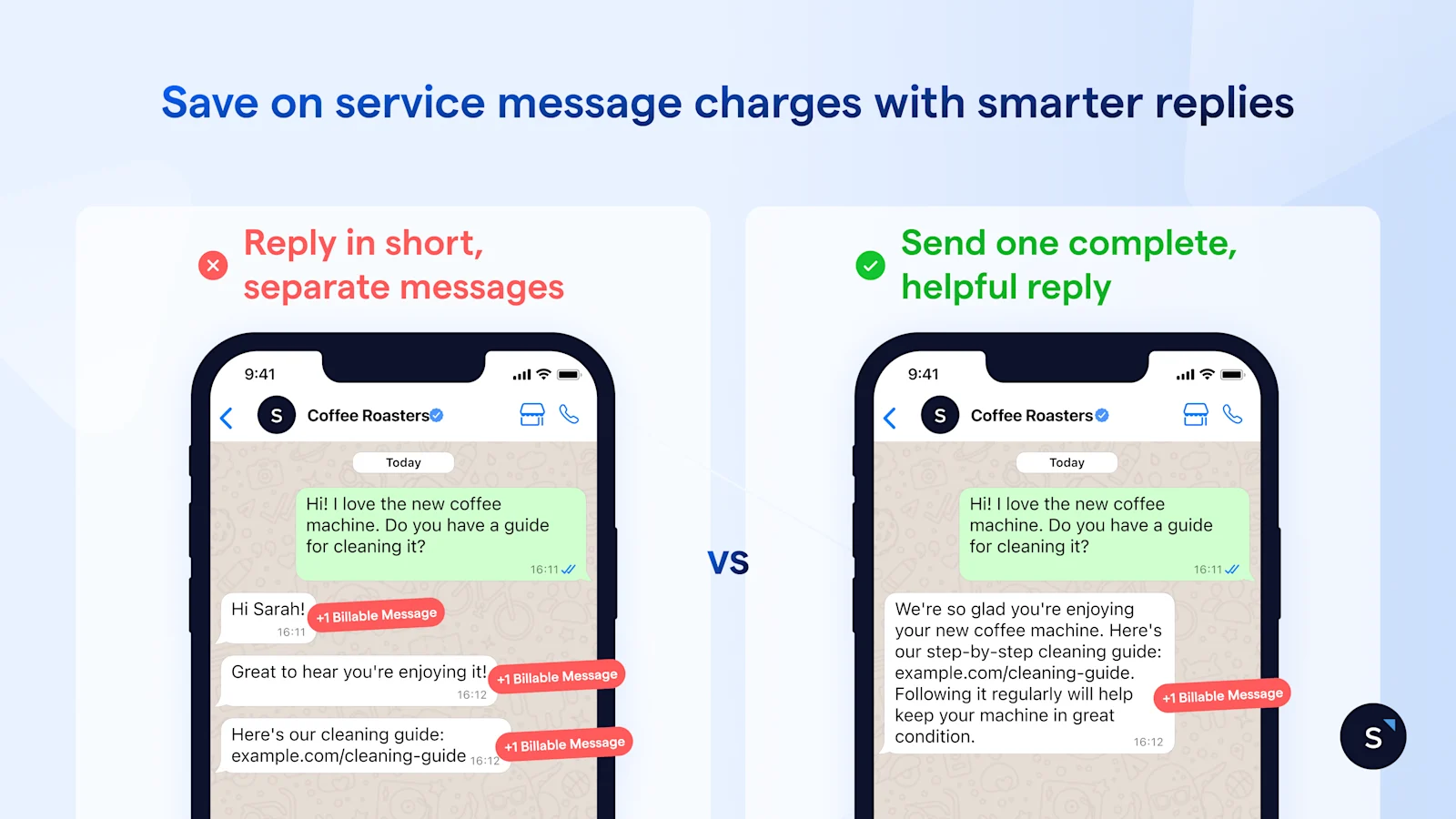
Every extra message inside the window is another service charge, so send one complete message instead of a stack of them. This applies to human and AI agents.
Agents drip-feed replies:
"Hi, Sarah! "
"Let me check"
"Can you share your order number?"
That's three billable messages for one exchange. Train them to send one:
"Hi Sarah, happy to help with your refund. Please share your order number, and I'll process it right away." One message, same warmth, one third of the cost.
AI agents fall into the same trap. Say a customer books an appointment, and your system sends the arrival details as a burst of short messages: one for the address, one for parking, one for the documents to bring.
That's three or four service messages for a single booking.
You may instruct your AI agent to reply with one message that links to the full details or attaches them, so several updates collapse into one, and the customer loses nothing. In SleekFlow, you can set that behavior in the AI agent's playbook with plain language, so you control when it consolidates rather than leaving it to chance.
2. Compress data collection with WhatsApp Flows
When you need several pieces of information, don't ask for them one message at a time. A return request usually turns into a five-message interrogation:
name
phone number
order number
reason for return
preferred resolution
Each question a separate service message.
Replace that with a single WhatsApp Flows. The customer taps once and fills in all the details on one interactive form, then submits.
You collect everything in a single message instead of ten back-and-forth texts, and the data lands structured and ready to route.
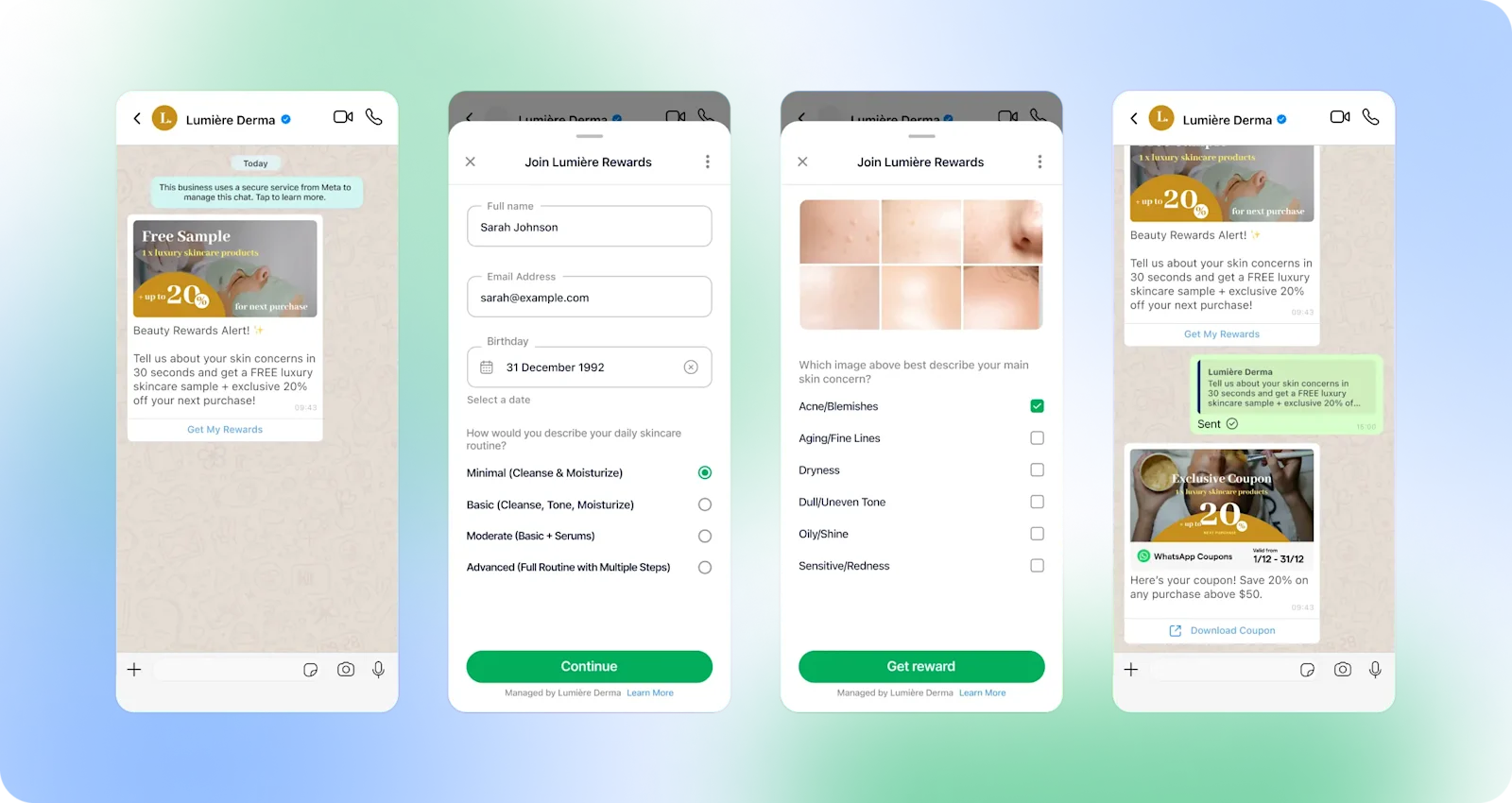
WhatsApp Flows are sent as marketing messages. While a marketing message costs more than a single service message, it can replace several service messages—often making the overall interaction more cost-effective.
Learn more about WhatsApp Flow: WhatsApp Flows & Use Case Examples for Businesses
3. Work the free entry point window with an AI agent
Conversations that start from a Click-to-WhatsApp ad or a Facebook Call-to-action button can open a free entry point window that may remain open for up to 7 days, during which Service messages are free.
The cost leak isn't the window; it's letting it expire unused.
Say a prospect clicks your ad and messages you at 10 am on Saturday. If your only human agent is out of the office and only replies at 10 am on Monday, the lead has waited 48 hours — enough time for interest to fade or for them to choose a competitor.
An AI sales agent answers in seconds: it greets the lead, asks qualifying questions, recommends the right product, and books the next step, while the customer's intent is still high.
And all these are inside the free window and at no per-service message cost. It hands off to a human only when the deal is ready to close, so your team spends its time on conversations that convert instead of triage.
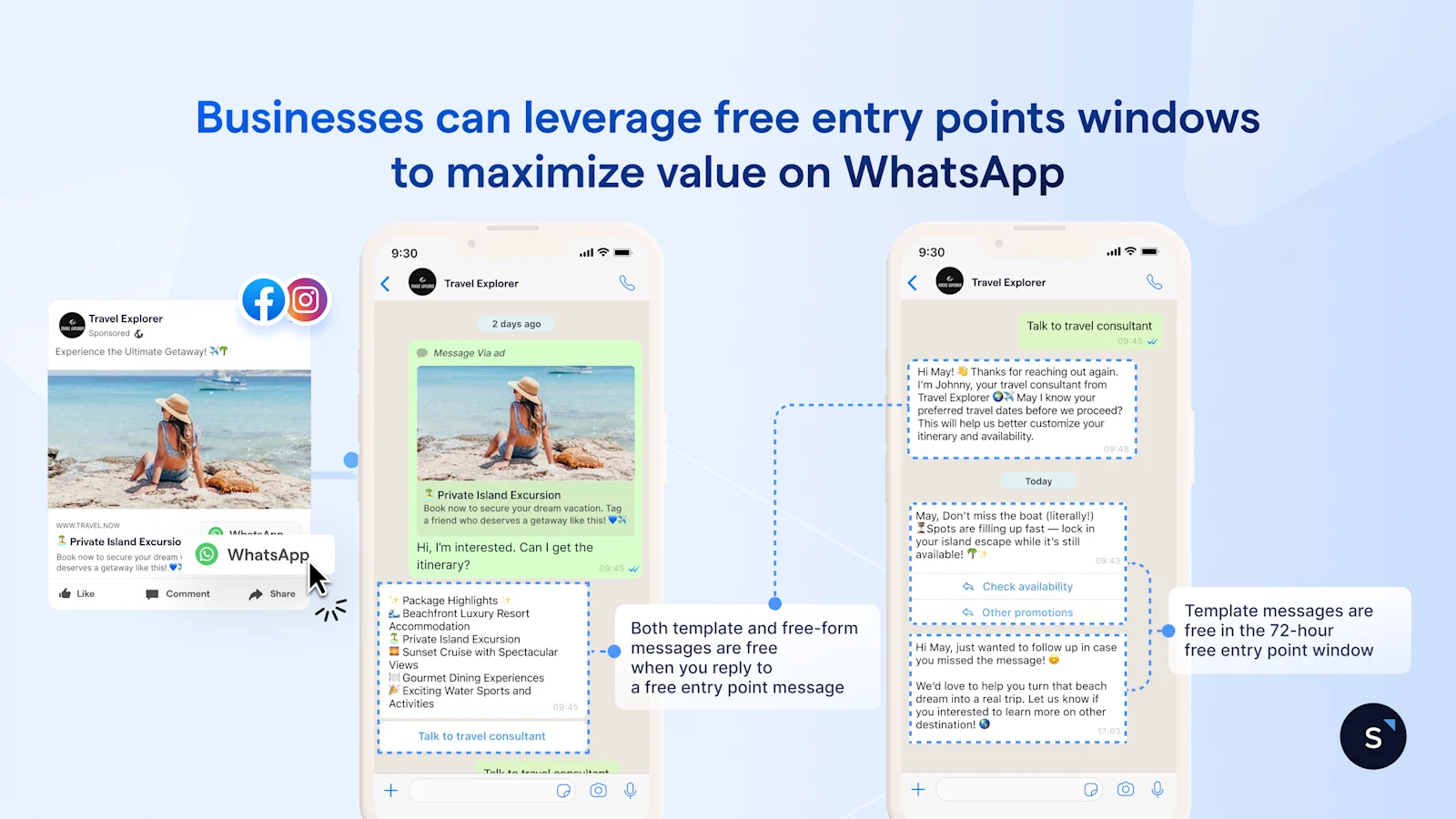
Within the free entry point window, which may remain open for up to 7 days, businesses can also leverage WhatsApp broadcasts or automated follow-ups with template messages, such as personalized offers, reminders, or surveys, to re-engage them and sustain conversation momentum.
4. Use Coexistence to keep using your WhatsApp Business App for free 1:1 conversations
The cost lever most teams miss: with WhatsApp Coexistence, messages your agents send from the WhatsApp Business App are free, even though the number is connected to the WhatsApp Business API. Only messages sent through the API get billed. The two run on the same number, in parallel, with separate billing.
So handle one-to-one conversations from the app at no per-message cost, and reserve the API for what it does: broadcast campaigns, AI automations, and give managers visibility across conversations.
5. Deflect low-value chats to alternative channels
Not every conversation earns a WhatsApp service charge. Send order-status checks, general FAQs, and document requests to lower-cost channels where your customers already are, and keep WhatsApp for the sales and support conversations that drive conversion and retention.
Pro tip: Add an AI chat widget to your website so visitors get answers there, instead of a WhatsApp widget that pushes every click into a billable WhatsApp thread. Route only high-intent visitors to WhatsApp.
SleekFlow's AI Growth Widget is not only a simple widget, but it can help transform website inquiries into conversions. Learn how to add a live chat to your website and turn conversations into revenue with AI
Confidently allocate your WhatsApp budget with SleekFlow
Every tactic above is easier with the right platform behind it. As a WhatsApp BSP, SleekFlow gives you the tools to keep your WhatsApp Business API costs under control:
Reply free from the app. With WhatsApp Coexistence, messages your team sends from the WhatsApp Business App stay free, even on an API-connected number.
Automate inside the free window. AI agents greet, qualify, and resolve inside the free Click-to-WhatsApp entry point window, which may remain open for up to 7 days, so more conversations close before charges apply.
Shorten conversations. Use WhatsApp Flows to replace long back-and-forths with a single interactive step, which cuts the number of billable messages.
Keep every channel in one place. Manage WhatsApp, Instagram, Messenger, Telegram, live chat, and email from one inbox, moving conversations across channels without losing context.
Turn the channel into revenue. Build optimized, automated Click-to-WhatsApp chat journeys, and connect your CRM and store, so WhatsApp earns its keep instead of only adding cost.

Want to outcompete your peers with SleekFlow's help?
Book your personalised demo with SleekFlow today and unlock the potential of seamless communication


