Email campaign analytics: the metrics, dashboards, and revenue insights that actually improve performance


TL; DR: Quick Summary
- Open rates are unreliable as a standalone metric in 2026. Click-through rate, conversion rate, and revenue per email are the primary performance signals worth optimising for.
- Every email type has different success criteria. Welcome emails, promotional sends, and re-engagement campaigns each need their own KPI set.
- Connecting email analytics to your contact data and sales pipeline is what turns campaign numbers into revenue action.
- AI tools change what is measurable: predictive scoring, send-time optimisation, and content intelligence all depend on integrated analytics.
- A correct analytics setup begins before the campaign launches, not after the results come in.
Most email marketing teams track the wrong things. Open rates look impressive on a dashboard, but since Apple's Mail Privacy Protection started pre-loading tracking pixels, those figures are inflated by an estimated 15 to 20 percentage points for many senders. The data looks fine. The results disappoint.
What is email marketing analytics?
Email marketing analytics is the measurement and interpretation of data generated by email campaigns, covering deliverability, engagement, and conversion outcomes. It answers three questions: did the email arrive, did the recipient act, and did that action produce a business result?
Most platforms surface the same basic metrics by default: opens, clicks, unsubscribes, and bounces. The gap between average teams and high-performing ones is rarely in data access. It is in knowing which metrics to prioritise for each campaign goal, and connecting those metrics to business outcomes rather than inbox activity.
Email campaign analytics is the practice of measuring, interpreting, and acting on the data your campaigns generate — not just reporting on it. Done correctly, it tells you which messages drive revenue, which audiences convert, and where your funnel is leaking.
Why email marketing analytics matters more than ever
Email remains the highest-returning digital channel available to most businesses. Research consistently puts email marketing ROI at $36 to $42 for every dollar spent, well above paid search, social advertising, or display. But that return depends entirely on measurement quality.
The standard metrics have become less trustworthy at the same time. Apple's Mail Privacy Protection pre-fetches emails before a user reads them, recording phantom opens. Some analyses now suggest up to 50% of reported opens in Apple-heavy audiences are not genuine interactions. Teams still optimising for open rate are, in many cases, chasing noise.
What replaces opens as the primary signal? Click-through rate, conversion rate, and revenue per email: metrics that require genuine user action and connect directly to business outcomes.
The only email metrics that matter by goal
Stop tracking every metric your platform offers. The right KPIs depend on what you are trying to achieve. The table below maps each campaign goal to its primary and secondary metrics.
Goal: awareness
For awareness campaigns, track open rate as a directional trend rather than an absolute number. Combine it with the list growth rate to assess whether your audience is expanding. Watch for spikes that indicate measurement inflation rather than genuine engagement.
Goal: traffic
Click-through rate is your headline metric. Pair it with click-to-open rate (CTOR): the share of openers who clicked. A low CTOR signals that your content or offer is not compelling enough once the email is opened, regardless of how many people your subject line attracted.
Goal: conversion
Conversion rate and revenue per email (RPE) are the only metrics that matter at this stage. Assisted conversions are also worth tracking: email is often one of several touchpoints before a purchase, and direct-attribution models consistently undercount its contribution in multi-step journeys.
Goal: retention
Focus on repeat purchase rate and subscriber lifetime value (LTV). Reactivation rate — the percentage of lapsed contacts re-engaged after a dormant period — is the clearest signal that your retention sequences are working. A declining LTV is an early warning sign before churn becomes visible in revenue figures.
How to set up email campaign analytics correctly
A broken setup produces misleading data. Work through these steps before any campaign goes live.
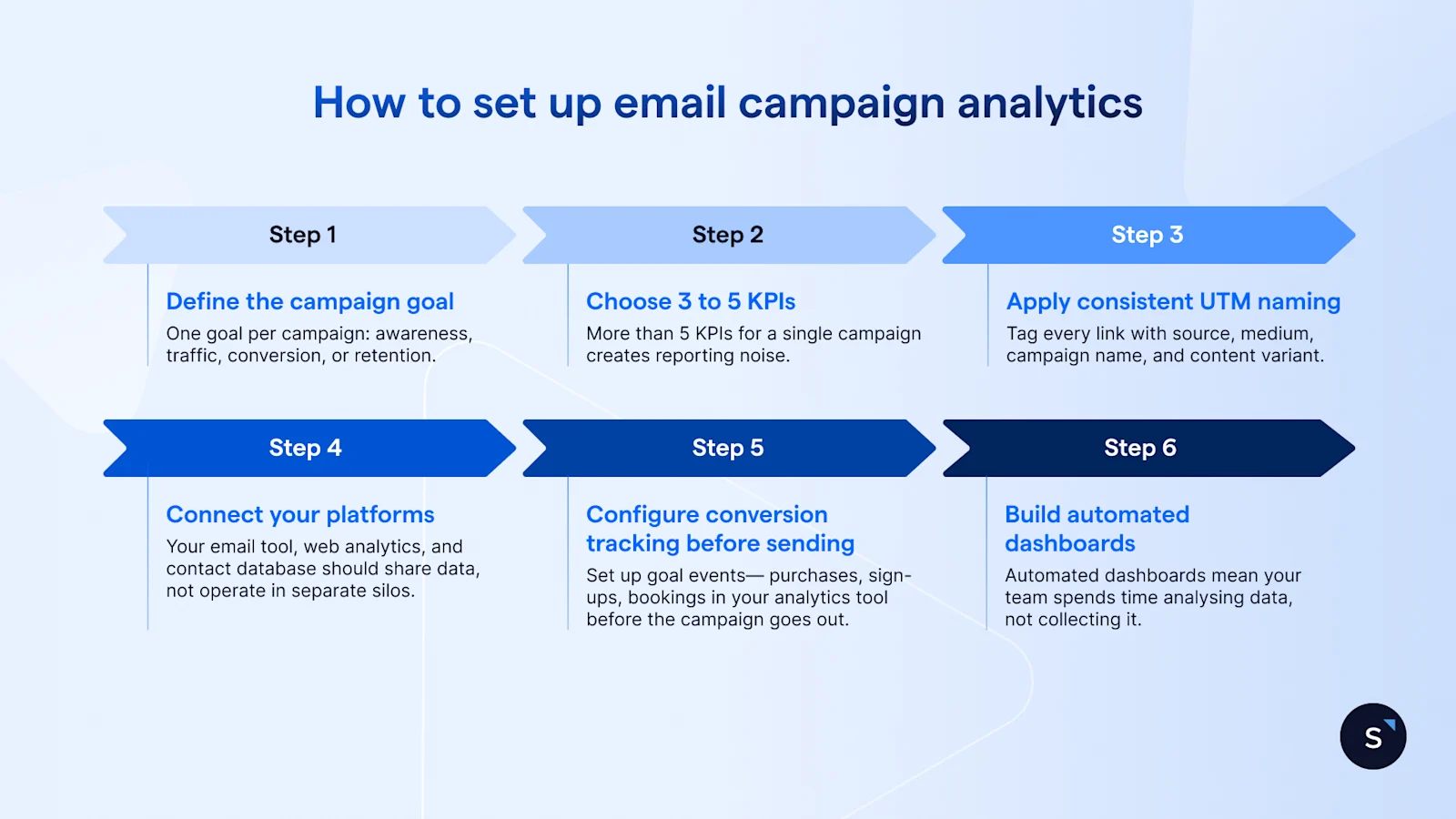
1. Define the campaign goal. One goal per campaign: awareness, traffic, conversion, or retention. Campaigns that chase multiple goals at once produce metrics that cannot be meaningfully compared or acted on.
2. Choose 3 to 5 KPIs. Match them to the goal using the table in the section above. More than 5 KPIs for a single campaign creates reporting noise. Fewer than three leaves blind spots.
3. Apply consistent UTM naming. Tag every link with source, medium, campaign name, and content variant. Inconsistent UTM naming is one of the most common reasons email attribution breaks down in web analytics. Agree on a naming convention before the first campaign, and enforce it.
4. Connect your platforms. Your email tool, web analytics, and contact database should share data, not operate in separate silos. Without this connection, a click in your email platform and a purchase in your analytics tool look like two unrelated events.
5. Configure conversion tracking before sending. Set up goal events— purchases, sign-ups, bookings in your analytics tool before the campaign goes out. Conversion tracking added after the fact cannot be applied retroactively to sends that already happened.
6. Build automated dashboards. Manual reporting is slow and inconsistent. Automated dashboards mean your team spends time analysing data, not collecting it. Test your attribution logic before launch. If revenue is not flowing back from your web analytics to your email reporting, you are measuring clicks rather than outcomes.
How to analyse email performance across the lifecycle
Different email types have structurally different jobs, and their success metrics reflect that. The table below covers the 5 core lifecycle stages.
Two data points that contextualise these benchmarks: automated email flows generate around 320% more revenue than non-automated campaigns, and flow CTR averages around 5.58% compared to 2.09% for standard campaign sends. The gap is not coincidental. Automated lifecycle flows reach contacts at the right moment with contextually relevant content. The analytics should tell you when those moments are working — and when they are not.
How AI and social CRM data make email analytics more useful
Tracking metrics is the starting point. The next step is connecting those signals to contact-level data so you can act on what the numbers reveal.
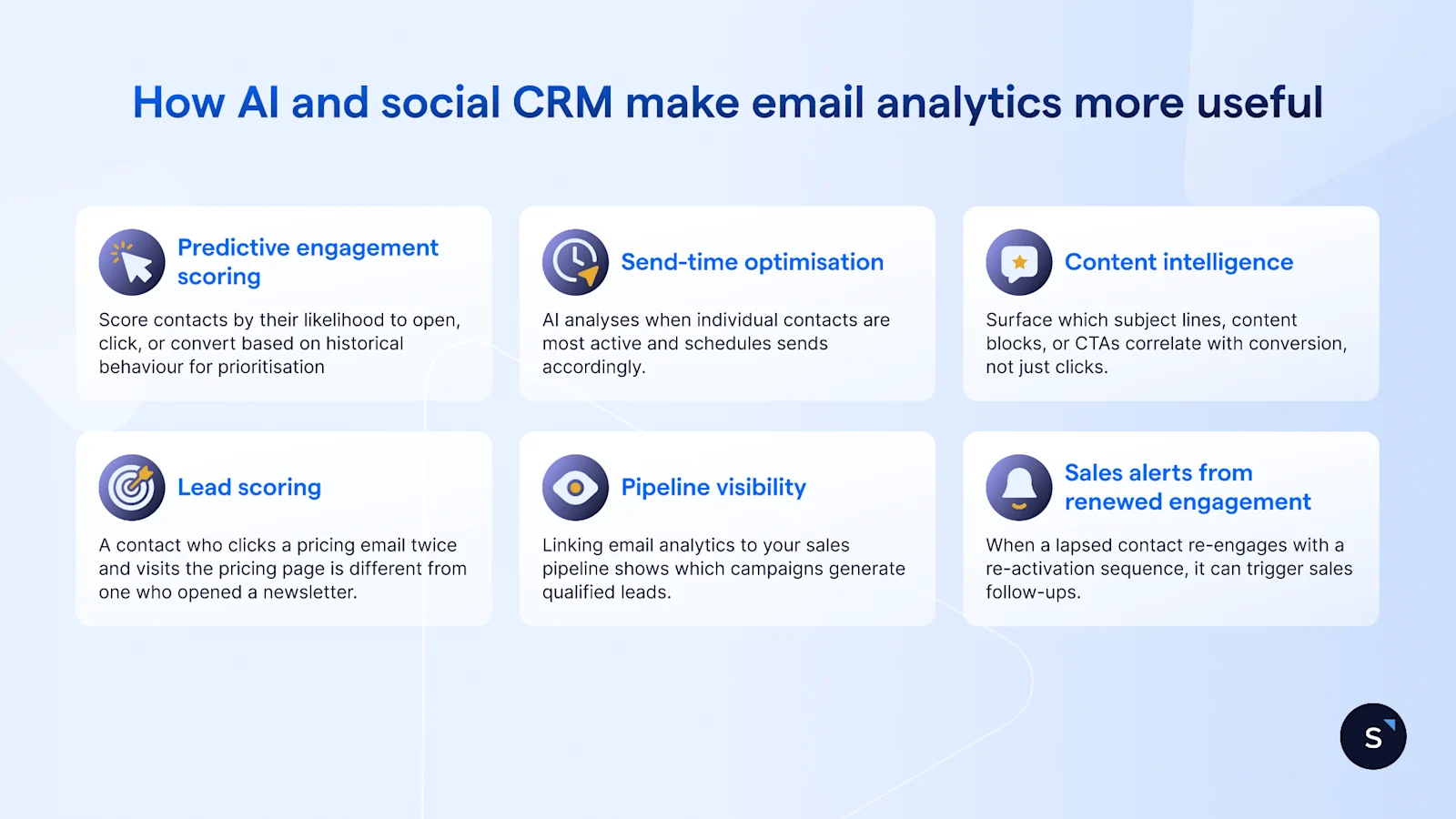
6 ways AI and social CRM integration improve what email analytics can do:
Predictive engagement scoring: Score contacts by their likelihood to open, click, or convert based on historical behaviour, then prioritise high-intent segments for your next send.
Send-time optimisation: AI analyses when individual contacts are most active and schedules sends accordingly, rather than applying a single send time across the whole list.
Content intelligence: Surface which subject lines, content blocks, or CTAs correlate with conversion, not just clicks, so future campaigns are built on what actually drives revenue.
Lead scoring via social CRM: When email engagement data feeds into your contact records, it enriches lead scores. A contact who clicks a pricing email twice and visits the pricing page is different from one who opens a newsletter.
Pipeline visibility: Linking email analytics to your sales pipeline shows which campaigns generate qualified leads — and at which stage of the funnel they convert.
Sales alerts from renewed engagement: When a lapsed contact re-engages with a re-activation sequence, that signal can automatically trigger a sales follow-up.
AI personalisation can drive up to 41% higher revenue from email campaigns. That lift does not come from personalisation alone. It comes from personalisation informed by accurate analytics connected to real contact behaviour.
How SleekFlow turns email analytics into revenue actions
SleekFlow brings email into the same inbox and automation layer as WhatsApp, Instagram, and other messaging channels. The practical consequence for analytics is that campaign data no longer sits in isolation. An email click, a WhatsApp reply, and a product page visit can all update the same contact record, so your team sees the full picture of how a contact is engaging rather than only their email behaviour.


