AI knowledge base chatbot: how it works and how to build one


TL; DR: Quick Summary
- An AI knowledge base chatbot answers customer questions from your help articles, PDFs, and web pages, in plain language rather than links.
- Gartner found only 14% of service issues are fully resolved in self-service, despite 73% of customers trying it.
- Most teams run both types: a scripted flow for fixed-sequence transactions, and retrieval for the long tail nobody can script.
- The build takes 5 steps: gather sources, connect them, test with real questions, set escalation rules, review weekly.
- Accuracy comes from the knowledge base, not the model, so grounding and a clean handoff decide whether it survives launch.
A customer asks whether your warranty covers a unit installed by someone else. The answer exists, on page 3 of a PDF nobody has opened since March. She types the question into your website chat, gets three article links, and messages you on WhatsApp anyway.
That gap is what a knowledge base chatbot closes. Below: how one works, how it differs from a rule-based bot, and the 5 steps to build one.
What is an AI knowledge base chatbot?
An AI knowledge base chatbot is a customer-facing assistant that uses generative AI to answer questions from a connected set of sources, such as help articles, PDFs, and web pages. Rather than matching keywords and returning links, it reads the relevant content and replies in natural language, then escalates when the answer is not there.
The phrase "knowledge base" does the heavy lifting. The assistant holds no independent knowledge of your refund window or your rates, and everything it says should trace back to a document you approved.
That constraint is the point, and it explains why self-service still disappoints: Gartner's survey of 5,728 customers found 73% try it during an enquiry, while only 14% finish there.
How does a knowledge base chatbot work?
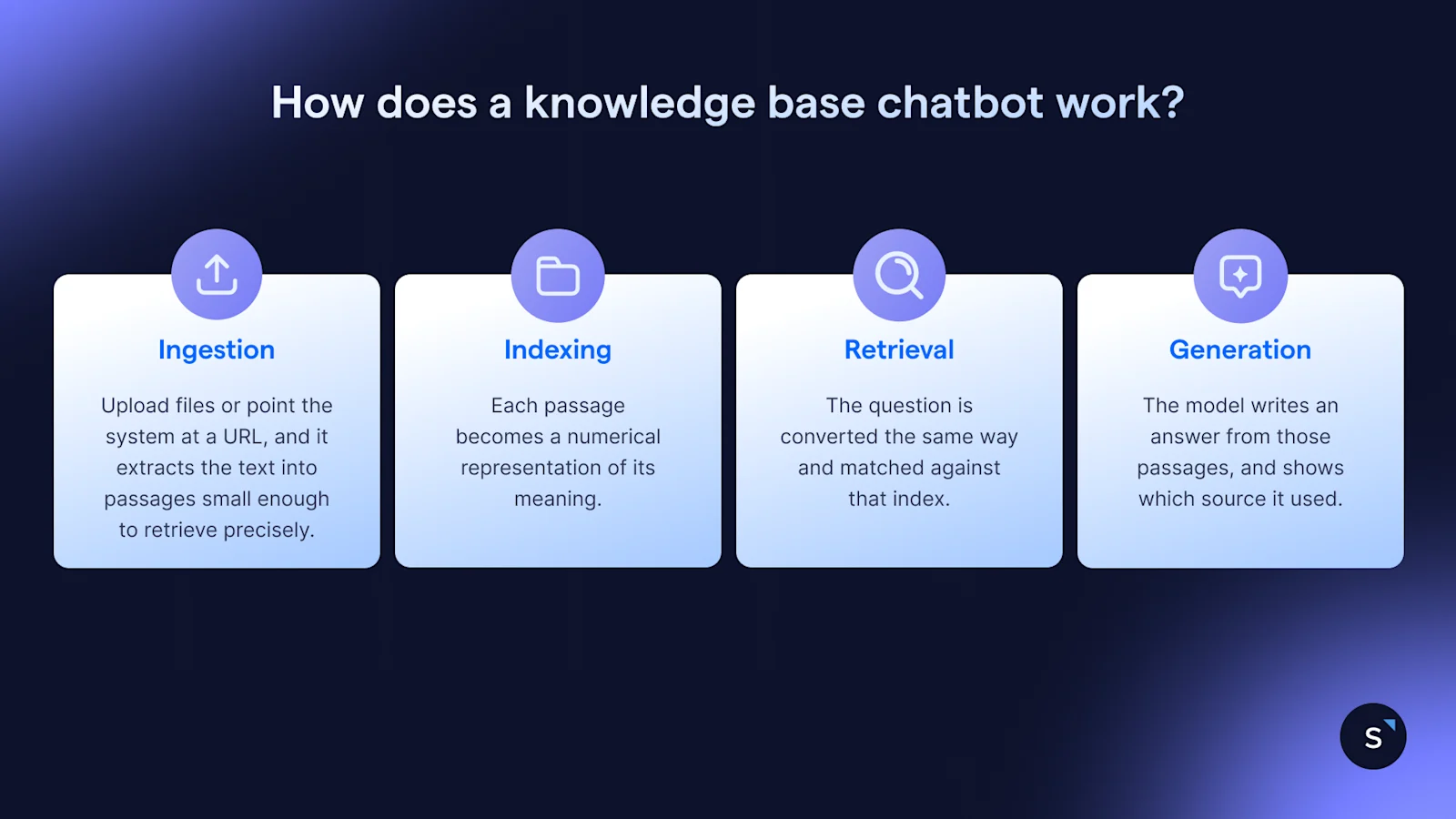
A knowledge base chatbot works in four stages. It splits your documents into searchable passages, matches an incoming question to the closest passages by meaning rather than keywords, feeds those passages to a language model as context, then writes an answer grounded in that retrieved text. The pattern is called retrieval-augmented generation.
Ingestion. You upload files or point the system at a URL, and it extracts the text into passages small enough to retrieve precisely.
Indexing. Each passage becomes a numerical representation of its meaning, so "can I get my money back" lands near a refunds paragraph with no words in common.
Retrieval. The question is converted the same way and matched against that index. The top-scoring passages become the context for one reply.
Generation. The model writes an answer from those passages, and shows which source it used.
Nothing here teaches the model your business. The model stays generic, and retrieval makes the answer yours, which puts accuracy with your content team, not your AI vendor.
AI knowledge base chatbot vs traditional chatbot: what is the difference?
A traditional chatbot follows a scripted decision tree and matches keywords, so it answers only what someone built a flow for. An AI knowledge base chatbot retrieves passages from your documents and generates a reply, so it handles phrasing nobody anticipated. The trade is predictable wording against much wider coverage.
Scripted flows never say anything you did not write, which is why identity checks and payment collection still belong in one. Most teams run both: a flow for fixed-sequence transactions, retrieval for the long tail.
What are the benefits of a knowledge base chatbot?
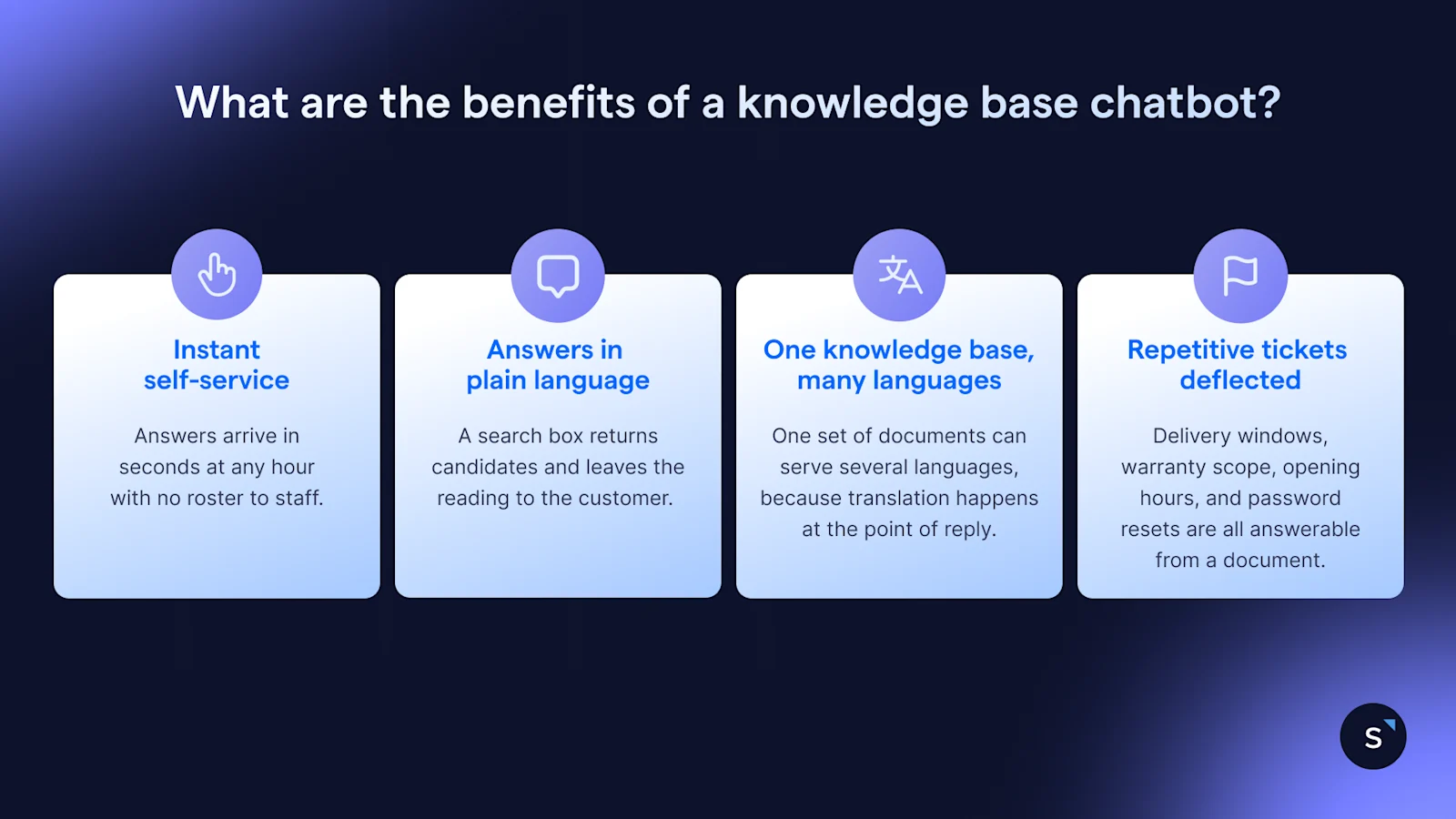
The main benefits are self-service around the clock, answers in plain language instead of a list of links, replies in several languages from one set of documents, and fewer repetitive tickets, which leaves human agents on the cases that need judgement.
Instant self-service, around the clock
Answers arrive in seconds at any hour with no roster to staff. Gartner expects self-service, live chat, and knowledge management systems to displace phone and email as the top service technologies by 2027, from 265 service leaders surveyed in 2025.
Answers in plain language, not a list of links
A search box returns candidates and leaves the reading to the customer. A generative reply does the reading and hands back the answer. In the same Gartner customer survey, 45% said the company did not understand what they wanted, and 43% could not find relevant content.
One knowledge base, many languages
One set of documents can serve several languages, because translation happens at the point of reply rather than in a parallel flow. That matters here: English is the language most frequently spoken at home for 48.3% of Singapore residents, then Mandarin at 29.9%, Malay at 9.2%, and Tamil at 2.5%.
Repetitive tickets deflected, so agents take the hard cases
Delivery windows, warranty scope, opening hours, and password resets are all answerable from a document, and each one handled by AI is a ticket an agent never opens. Gartner projects agentic AI will resolve 80% of common service issues autonomously by 2029, cutting operating costs by 30%.
How to build a knowledge base chatbot in 5 steps
Building one takes 5 steps: assemble the source content, connect it as the knowledge base, test with real customer questions, set escalation rules for anything out of scope, then refine using conversation data. The content work is the bulk of the effort.
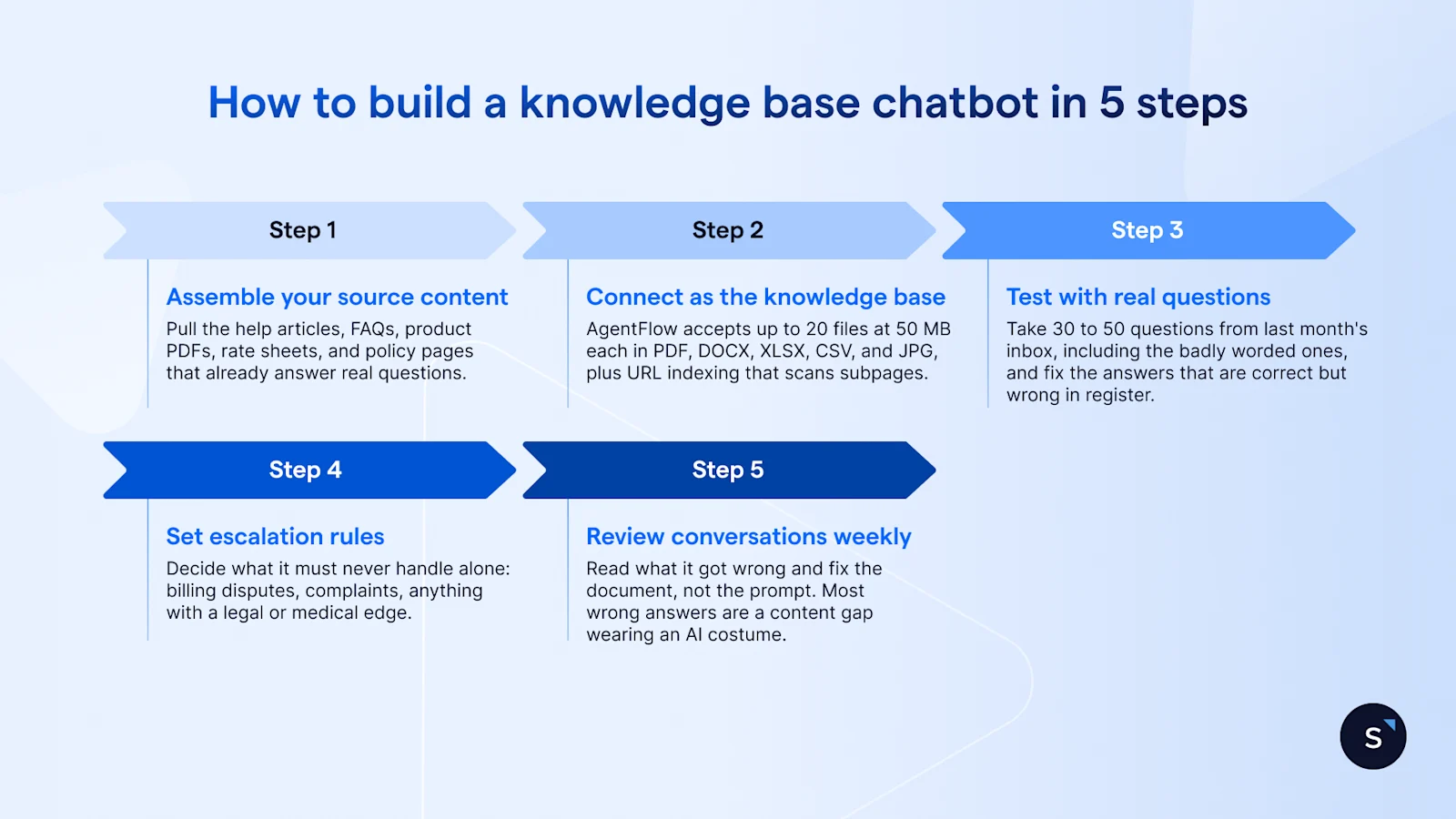
Assemble your source content. Pull the help articles, FAQs, product PDFs, rate sheets, and policy pages that already answer real questions. Delete anything superseded first, because a stale document does more damage than a missing one.
Connect it as the knowledge base. AgentFlow accepts up to 20 files at 50 MB each in PDF, DOCX, XLSX, CSV, and JPG, plus URL indexing that scans subpages. Only text is extracted, so a scanned price list gives the AI nothing.
Test with real questions. Take 30 to 50 questions from last month's inbox, including the badly worded ones, and fix the answers that are correct but wrong in register.
Set escalation rules. Decide what it must never handle alone: billing disputes, complaints, anything with a legal or medical edge. Route those to a person with the transcript attached.
Review conversations weekly. Read what it got wrong and fix the document, not the prompt. Most wrong answers are a content gap wearing an AI costume.
How to keep a knowledge base chatbot accurate
Accuracy comes from content discipline rather than model choice. Ground the assistant strictly in approved sources so it cannot fall back on general training data, keep those sources current, give it permission to say it does not know, and review transcripts on a schedule someone owns by name.
Ground every answer in your sources. A grounded assistant is only wrong where your documents are wrong, which is fixable.
Give it an exit. With no way to defer, it fills the gap with fluent guesswork, and customers cannot tell until it costs them.
Name the weekly reviewer. Ownerless review decays inside a month. Budget it as support work.
Watch the questions it could not answer. That list is your content backlog, ranked by demand.
Deloitte found 72% of Singapore leaders plan to deploy agentic AI across several operational areas within two years, up from 15% today. The ones who get value will be the ones whose content was already in order.
How SleekFlow's AI uses your knowledge base
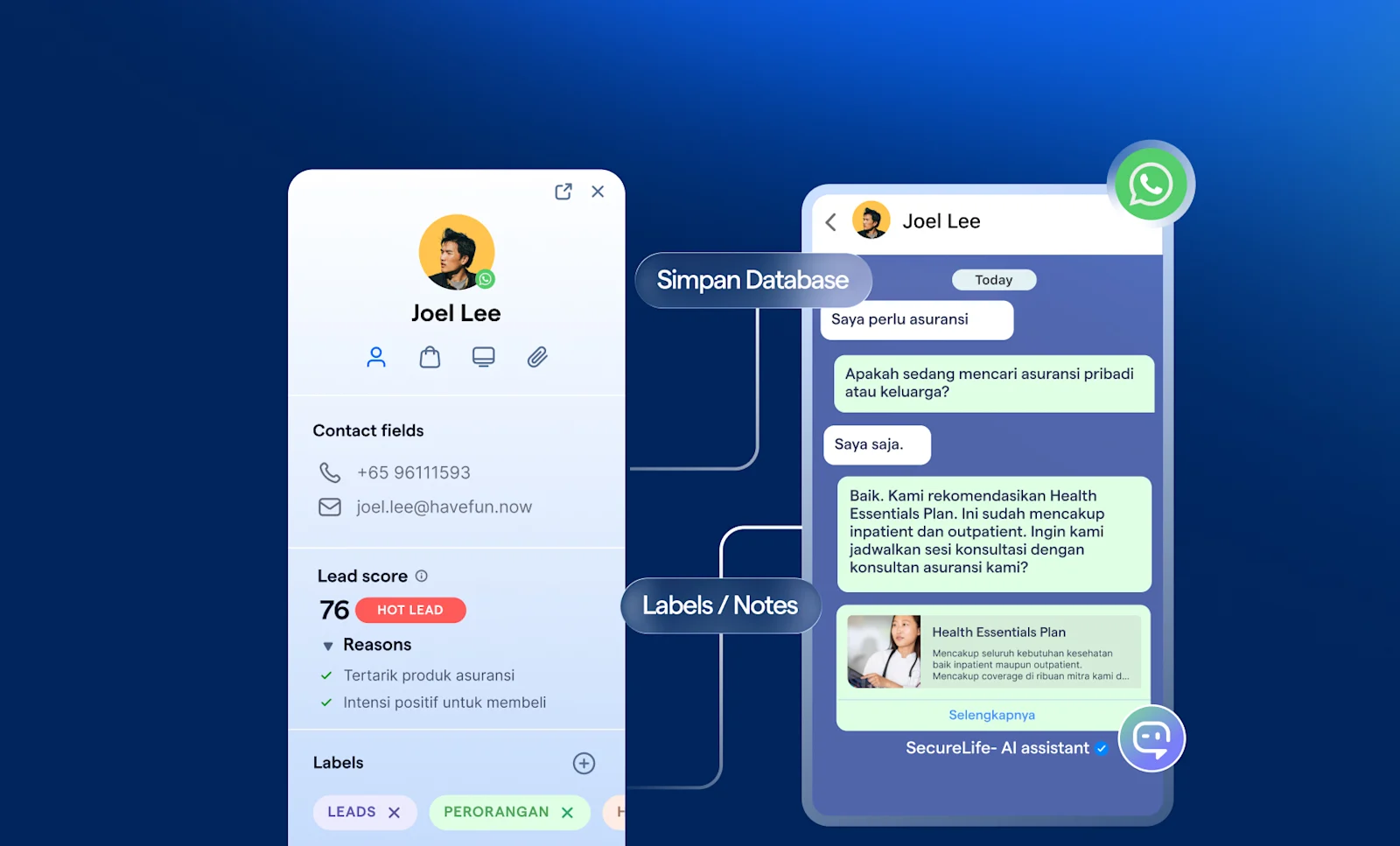
SleekFlow is an AI suite for revenue-driving conversations, and AgentFlow is the product inside it that runs AI agents across WhatsApp, Instagram, Messenger, and website chat. You upload a PDF or point it at a website, and it uses that content as the agent's knowledge base to answer enquiries in natural language.
Escalation is a setting, not an afterthought. You control when AgentFlow hands off, based on sentiment, topic, or task completion, and whoever picks it up gets a full summary.
SACES, a Singapore home services company, was answering the same air-conditioning enquiries by hand across WhatsApp, Facebook, and Instagram, which slowed speed-to-lead. They deployed AgentFlow AI agents trained on FAQs, manufacturer brochures, and service rate sheets, generating pricing replies by service type and unit count.
Results:
75% enquiry-to-booking conversion on AI-qualified leads
90% faster response time
Over 60% of incoming enquiries handled by AI agents
15% more conversions from roadshows
"A lot of times I see customers asking a lot of questions, and I think, thank God I don't need to type all of that out myself," says Jerome Koh, Director at SACES. Read the full case study →
Start with the content you already have
Pick the 10 questions your team answers most often this week. Check whether each answer exists in a document a customer could be shown, and rewrite the ones that do not. That list is your first knowledge base, and assembling it takes longer than choosing a platform.

See how AgentFlow answers from your own documents.
Book a demo and bring one of those PDFs.


